still building, most days
What’s new in Arbor
The features we’ve added lately, what each one does, and where to find it.
September 9, 2026 · newest
Pick the days you do school
Settings, under Teaching, has a row of five days. Tap the days you do school and every kid's week moves with it: a Monday subject stays weekly and lands on the next day you picked, and nothing is ever put on a day you took off. New families start on Monday to Thursday.
September 9, 2026
Refer a friend from Settings
Your own invite link is in Settings, under Refer a friend. Send it to a friend who homeschools and their first month of Arbor is free. When they pay for their first month, a month of your plan comes off your next bill. The friends who joined, and the free months you've earned, are listed right there.
August 28, 2026
Algebra I and Algebra II, written by Arbor
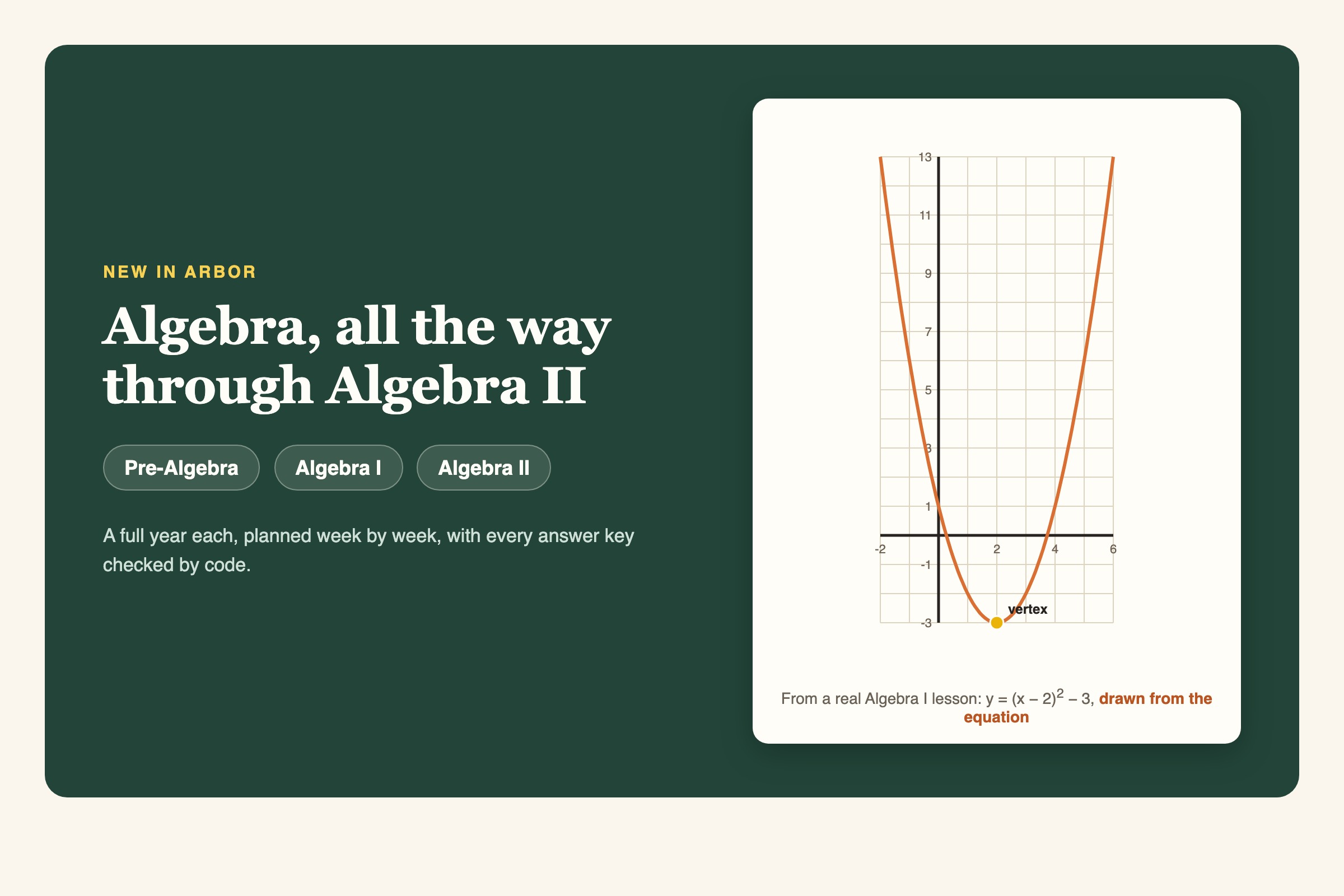
The most asked-for thing in Arbor's history is here: the math sequence now runs all the way through Algebra II. Pre-Algebra, Algebra I, and Algebra II arrive as real courses, a full year each, planned week by week with worked examples, graphs drawn from the actual equations, and worksheets whose answer keys are verified by code, not vibes: every solve-for-x answer is checked by substitution and every rounded decimal is recomputed from its exact form before you ever see it. A high schooler working below Algebra still gets placed K-8 math at exactly their level. Geometry, Pre-Calculus, and Calculus stay recommend-a-program for now, and we'll only change that the same way: with proof. Add Algebra I or Algebra II from the Plan page, or rename a math subject to the course.
August 26, 2026
Health lessons for the elementary years
Add Health to a K-5 kid's year and Arbor writes the lessons. Real units on nutrition and reading a food label, how the body's systems work together, sleep, first aid, germs, and staying safe. Everything past that age, and every part of health that touches sexuality, identity, or substances, stays yours to teach on your timing and from your convictions; for older kids Arbor helps you pick a health program instead. Pick Health when you add a subject on the Plan page.
August 26, 2026
Music Appreciation, taught by listening
Arbor now writes Music Appreciation. Each lesson is built around one or two famous works you can play from whatever music service your family already uses, then what to listen for in plain words, discussion questions, and a short written response. Composers, eras, and the moment the melody comes back changed. Instrument lessons still belong with a teacher and a method book; this is the listening half, and it works from a kitchen speaker.
August 20, 2026
Lessons that adjust themselves to what your kid knows
Every worksheet problem now belongs to a named skill, and every grade you confirm lands on a skill map for your child. When something needs another pass, a problem or two on an upcoming worksheet quietly practices it, mixed in naturally, and the sheet never gets longer. When the evidence says your child is ready to move up a level, Arbor says so and waits for your word. You teach and snap the finished page; Arbor keeps track of what needs review.
- No photo handy? Tap mark the answers on any lesson instead: the worksheet's problems appear as a quick list, you tap right or wrong, and the same map fills in.
- Tick a skill as already solid on the subject's page (she's had regrouping down for years) and it counts as evidence too.
- Prefer worksheets that stay on the day's topic? Turn the woven review off in Settings.
August 20, 2026
A Friday note on how the week actually went
Progress now has a section that names what your child knows: each skill from their graded work, in plain words, with where it stands. Today shows a short line or two from the same source when there is something worth knowing, and on Friday afternoons Shelby's weekly note arrives with the week's wins and what Arbor adjusted, so you hear what happened without opening a dashboard. If there is nothing to say, it stays quiet.
- The note only exists when your family taught that week. No padding, no empty cheerleading.
- You can turn it off in Settings any time.
August 20, 2026
A placement check, from the subject page
When you are not sure what level your child should be working at, open the subject's Level and start a check. It prints one gentle sheet at the level you are wondering about, your kid works it alone, you snap the finished page, and the results land on their skill map showing exactly where the ladder stops. Levels only change when you say so; the check just gives you real paper evidence to decide with.
August 20, 2026
Tell Arbor how your kid learns
Short attention span, hates writing, needs to move, has to see it first: note it once in Settings and every lesson after that changes shape to match. Fewer problems for the kid who fades, answers that never require sentences for the one who fights the pencil, movement built into the teaching itself. The level never drops; the form bends to your kid.
August 20, 2026
Every subject is now a course you can print
Open any subject on the Plan page and tap Course page: your child's year has a real course name, a description a curriculum catalog would print, the arc of units with the skills each one teaches, and a week by week view of taught against planned. From there, print the whole thing as a course book, and when the year is done, print a certificate of completion. You sign both, because you issue them; Arbor supplies the evidence and the paper.
August 18, 2026
Snap the finished worksheet, and Arbor grades it
When you mark a lesson done, photograph your child's completed worksheet and Arbor checks it against the answer key, problem by problem. It shows you every answer it read, suggests the grade, and waits for you to confirm before anything touches the record book. Then comes our favorite part. Arbor tells you what it noticed, which skills have clicked and which are still shaky, and once you save that note, the lessons ahead adjust to the finding on their own.
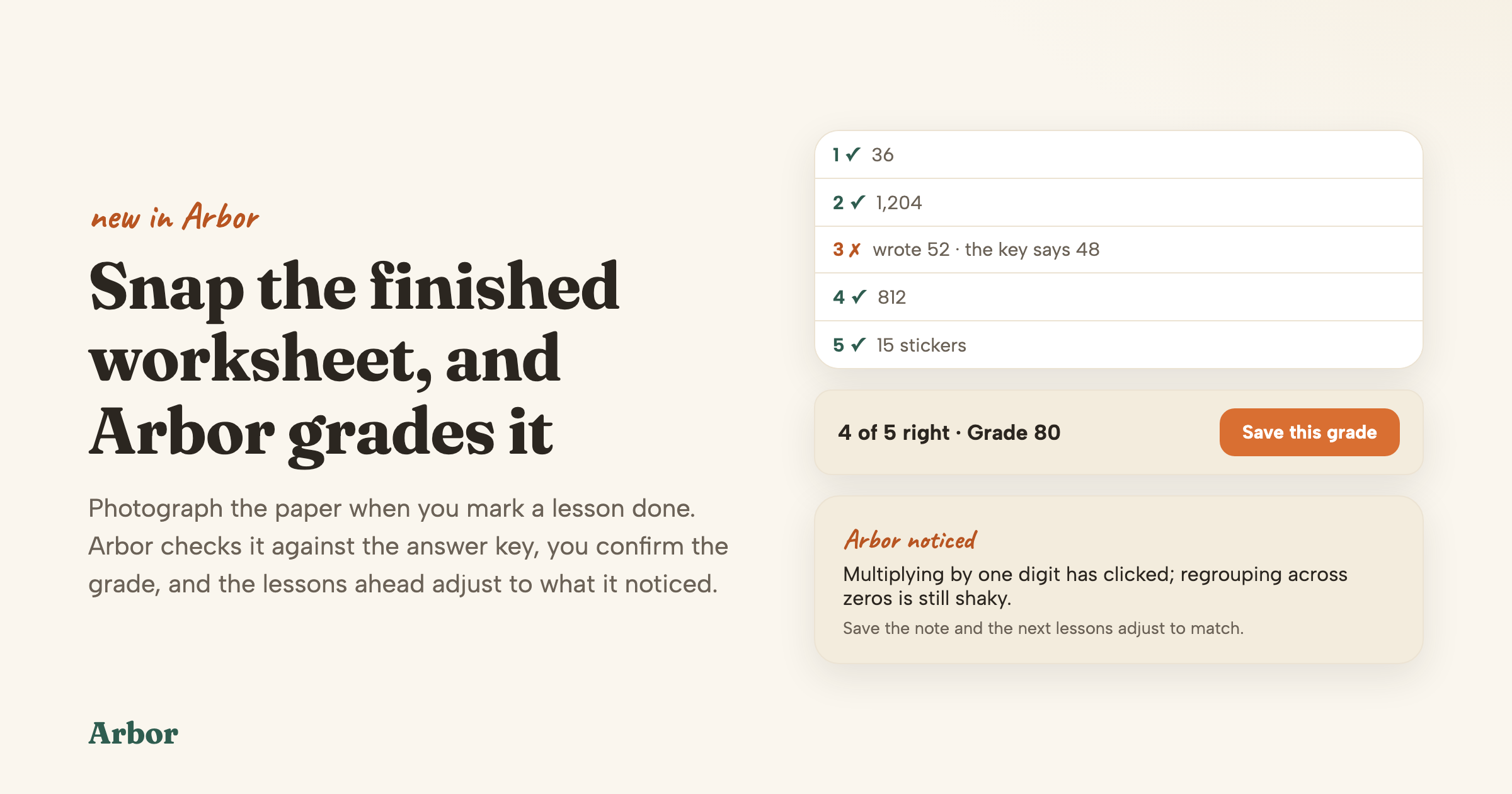
- More practice lands where your child needs it, and lessons ease off what is already mastered. One tap on Save note is all it takes.
- Anything too smudged to read is never counted wrong. Tap type what they wrote, and Arbor rechecks that answer instantly.
- The photo stays on the lesson, so your record book keeps the work behind every grade.
August 18, 2026
Photograph your own curriculum, and Arbor plans it
This is the one we're most excited about. If you teach a subject from your own book, snap a few photos of it: the contents pages, the cover, a lesson or two. Arbor reads your book, figures out how many lessons it holds and how big each one is, and lays the whole thing across your school year on the days that subject already meets. You see every week before anything saves, and your book's lessons show up right beside Arbor's own.
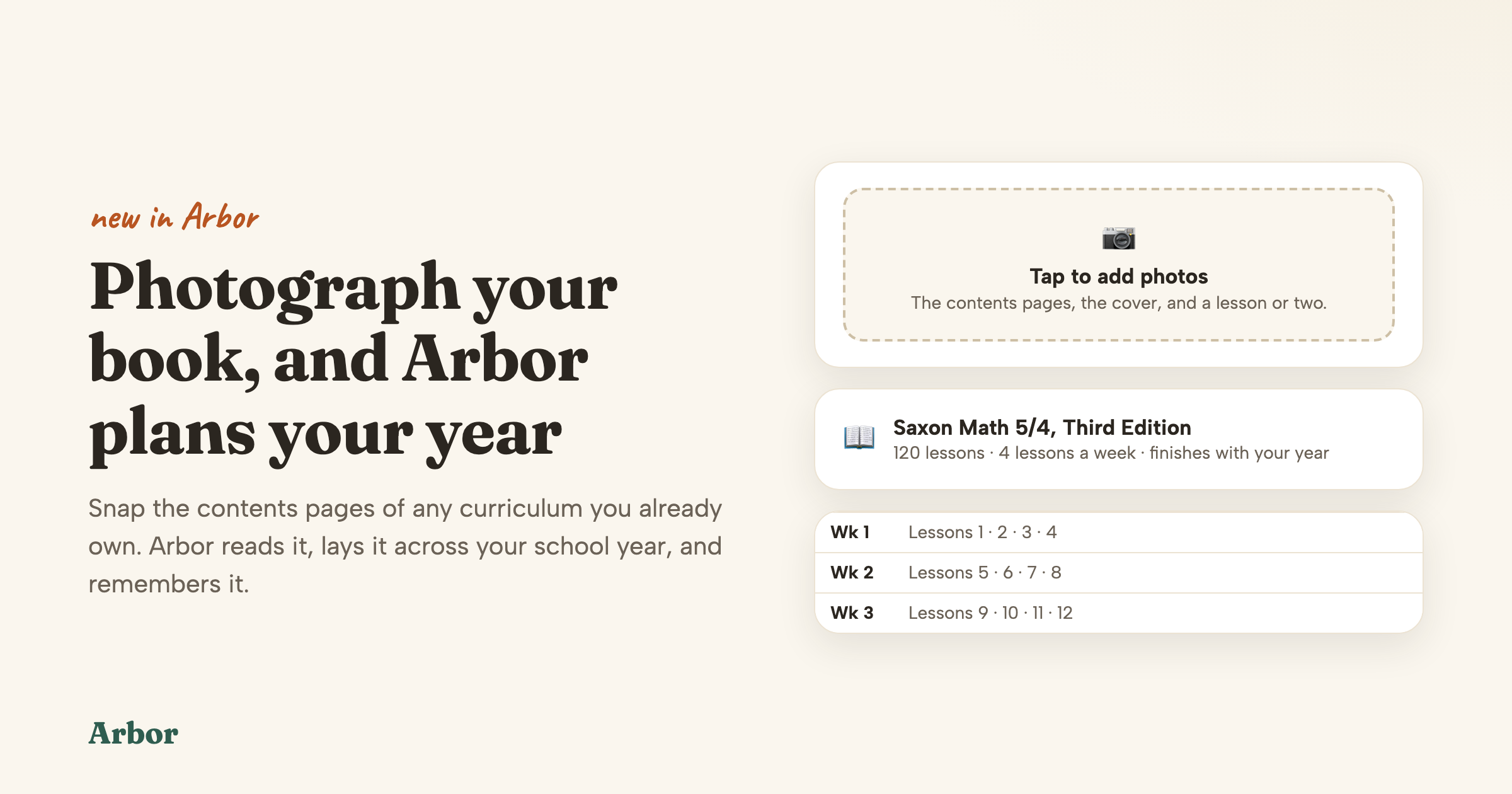
- Pick the pace that fits, whether that is finishing with your year, following your weekly rhythm, or taking it gently one lesson a week. Big two-year books get an honest two-year plan.
- Already partway through? Tell Arbor where you are and it plans from there.
- Arbor remembers your book, so changing the pace later never means finding the camera again.
- Find it on your Plan page, where every subject marked as your own curriculum has an Add my book button.
August 9, 2026
Now you only pay for two children
$24.99 a month covers each of your first two kids, and your third child and every child after is free. Children are a blessing, and adding another one to the table should never make school cost more.
August 3, 2026
Teaching videos, hand-picked for the lesson
This one is fun. When a concept is easier to show than to say, the lesson brings a short video with it from trusted channels like Khan Academy and SciShow Kids. Turn the screen around, have the aha moment together, then get back to teaching.
- It plays right on the lesson page, without wandering off into the rest of YouTube.
- Love a different one better? Preview the suggestions on the lesson and swap it in one tap.
- Keeping your homeschool screen-free? One switch in Settings keeps every lesson paper only.
August 3, 2026
Arbor can find a kid's level with you
“Where is my kid, really?” is the question every homeschool parent carries around. Open the subject's Level and Arbor figures it out with you, from real work and real moments at the table, then sets the level so lessons meet your kid exactly where they are.
August 3, 2026
Lesson minutes measured from the lesson
The minutes on a lesson mean it. A light phonics moment reads short, a meaty history build reads long, and the day adds up to a number you can actually build a morning around. Plan the coffee refill with confidence.
August 3, 2026
A free trial that waits for your first school day
Planning over the summer for a fall start? Your trial waits for you. Arbor moves it to cover your first real weeks of teaching, on its own, no card and nothing to ask for. Plan all summer; spend the trial actually teaching.
August 2, 2026
Print the week's worksheets in one go
Sunday night, one tap: every worksheet for the whole week comes off the printer in day order, ready to hand out all week long. It's under Week settings on the Calendar, next to printing the week's lessons and a schedule for the wall.
July 28, 2026
Tell Arbor how a child learns
Some kids have to see it. Some need it in their hands. Some need it three times, three ways. Tell Arbor once, in Settings, and every lesson written for that kid afterwards teaches the way they actually learn.
July 28, 2026
Print just the worksheet, with or without the answers
One tap on Print hands you exactly the paper you want: the whole lesson, the worksheet on its own, or a worksheet with no answer key on the back for the kid who reads upside down.
July 27, 2026
Arbor speaks up
When something would make a real difference for your family, Arbor says so first: a subject with no curriculum picked yet, a kid it barely knows, a child whose own work says they're ready for more. One gentle nudge at a time, and “not now” means not now.
July 25, 2026
A morning email with the day's plan
Your school day, in your inbox before the school day: what each kid has, what to gather, roughly how long it takes. The morning feels handled before the coffee is poured. On by default; Settings can switch it off.
July 25, 2026
Print a full week, and hand work back in
One button puts a whole week of lessons and worksheets in your hands, ready for Monday morning. And the work that isn't a worksheet, an essay or a photo of a finished page, attaches right to its lesson and stays with your records.
July 24, 2026
Self-guided subjects and the student desk
Hand a subject over. Mark it self-guided on the Plan page and your kid gets their own desk: today's work in that subject, written to them, at a private link with no login and no account. Answer keys, marking and records stay on your side.
July 24, 2026
Per-subject level, visible and adjustable
Every kid is racing ahead somewhere and taking their time somewhere else, and that's exactly how it should be. The Plan page shows where each subject really sits, lets you move it, and flags the happy day a kid looks ready to level up.
July 24, 2026
Log field trips, co-op and days off
The museum day counts. Log a field trip, co-op day, park day or sick day in one tap and it lands in the record book as a real school day, hours and all, right beside the lessons.
July 24, 2026
Billing stops after three children
A big family is a blessing, not a surcharge. $24.99 a month covers each of your first three kids, and your fourth, fifth and sixth are free. A family bill never passes $74.97, however many you teach.
July 23, 2026
High school: courses, credits, transcript
Grades 9 to 12 are open: years planned as courses, credits that add up as work completes, and a transcript you can print. Arbor writes the English, history, government, economics, logic, Latin, art and life-skills courses, and helps you choose a real program for the algebra track and lab sciences.
July 23, 2026
Set the exact skill a kid is working on
Name the precise skill your kid is on, like two-digit multiplication or blending CVC words, and lessons in that subject pick up from exactly there. No wasted weeks on either side of where they actually are.
July 22, 2026
A second parent login for one family
Homeschooling is a team sport in a lot of houses. Invite the other parent from Settings and they get their own login into the same homeschool: same kids, same plan, same records, and their own login to make changes from.
July 22, 2026
Sign-in links in Arbor emails
Tap a link in an email from Arbor and you land signed in, on the exact page it was about. The morning note goes straight to the day's teaching, one tap from your inbox.
July 20, 2026
Three tools that work without an account
Public pages anyone can use, including friends who haven't signed up:
- Printable worksheet sets, ready to print
- A grade-by-grade guide to what each subject covers
- Any Arbor lesson, shareable as a public page with your child's name removed
July 17, 2026
Real math notation in lessons and worksheets
A page of math looks like a page of math: real fractions, long division brackets, exponents and worked examples, on the screen and on the printed worksheet your kid holds.
July 17, 2026
Write in your own curriculum's weekly plan
The subjects you run your own way belong in the plan too. For a subject marked “we use our own program”, type what you're covering each week and Arbor schedules around it and keeps it in the records beside everything else.
July 16, 2026
Combine a subject across siblings
Teach it once. Two kids close in level can share a subject: one lesson at the table, recorded separately for each child, kept in step all year. Set it on the Plan page and enjoy the quieter morning.
July 16, 2026
Archive a year and start the next
When the year is done, Settings closes it out in one motion: each kid moves up a grade, a fresh plan is built, and the finished year is tucked away with its records, lessons and progress intact and still printable.
July 15, 2026
Progress: year map, on-track check, summaries
Open Progress and exhale. A day-by-day map of your whole school year, a plain answer to “are we on track?” for each kid, and a short written summary of how the year is really going, built from the teaching you actually did.
tell us what to build next
Most of this list came from a parent asking
Every one of these started with a family telling us what was hard. Message us from inside Arbor and it reaches Shelby and Nate, the two people who build it.